A clean, collegial send-off
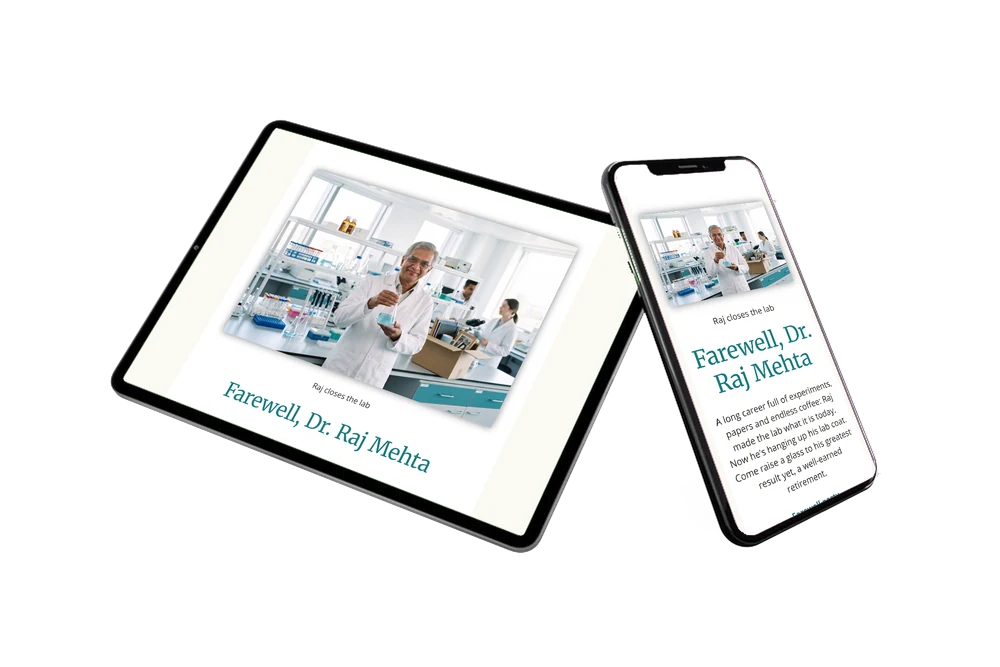
With an online farewell party invitation you invite a whole team through one link, and every guest finds the details, the venue and a place to say goodbye on the same page. Here the guests are the people who shared a lab with Raj for years. The white card opens with his photo among the test tubes, followed by a story they will recognise, so the invitation already feels like the start of the farewell.
Colleagues, students and old collaborators can write memories, thanks and inside jokes in the online guestbook. Those messages stay on the page, a lovely keepsake for the person retiring. In the meantime you see who is coming and remind anyone who has not replied yet.
Create your own online farewell invitation
Use this design as a starting point and create a fitting farewell invitation within minutes.
Frequently asked questions
How fast can guests receive the invitation?
As soon as you have filled in the date and venue, you can share the link. Many teams send it the same afternoon they decide on the party.
What can guests do on the page?
They confirm with the RSVP button, open the route, add the date to their calendar and leave a message in the guestbook. Former colleagues who cannot make it can still share a memory there.
Does the example text fit a retirement from the lab?
Yes. The heading about closing the lab and the toast to a well-earned retirement were written for a researcher leaving after a long career. The blocks below list the farewell party, a program with speeches and a strolling dinner, and a smart casual dress code.
What if I have no good photo of my colleague?
Upload any photo you like, for instance one from a team outing. If you would rather not use a photo at all, you can use an illustration instead. The headings and colours adjust in the editor.
Can I still change details after sending?
Yes. If the venue or start time changes, edit the invitation and guests see the update on the same link they already have.
Design details: fonts and colors
Fonts
- Header 1 — Open Sans
- Header 2 — Merriweather
- Text — Open Sans
Colors
- #2E2A26 — Header 1
- #1F7A80 — Header 2
- #2E2A26 — Text
- #FFFFFF — Card
- #FBF9F4 — Background
Use this design
Copy this design to your dashboard to use it as a starting point.

All example invitations are fictional. Photos of people are AI-generated; illustrations are licensed or AI-generated.