A sleek, industrial invitation
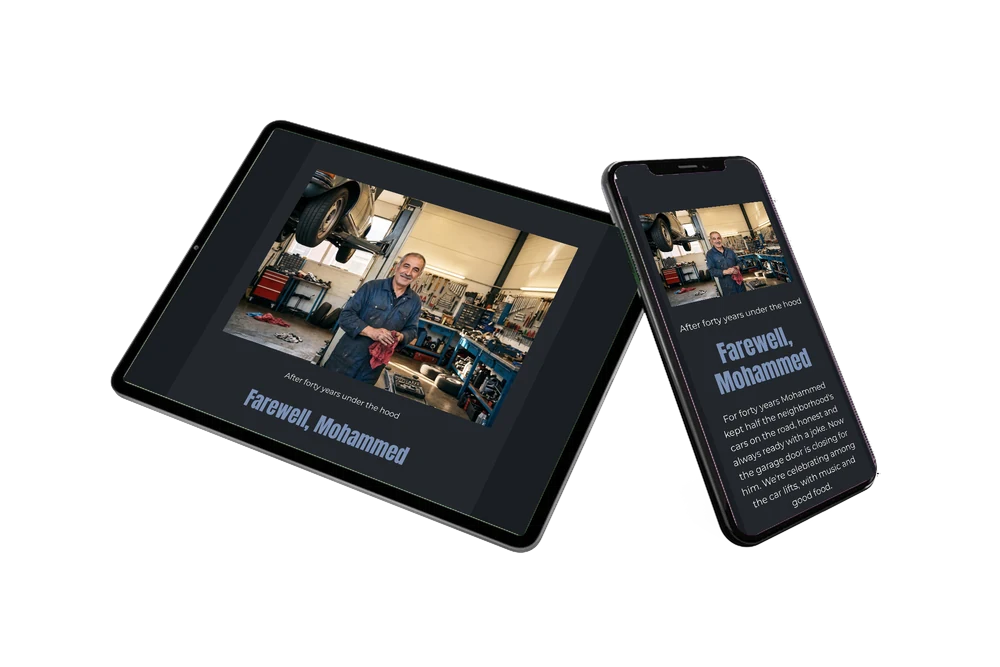
For guests, an online retirement party invitation is quick to take in: one link, one screen and everything they need, including a button to say they will come. Here the wide photo at the top shows Mohammed smiling in his workshop, wiping his hands, with a car on the lift above his shoulder. For customers who trusted him with their cars for years, that picture says more than a long letter. The charcoal card below tells the rest in light text. The man in the photo is AI-generated, so swap in a photo of your own mechanic.
Guests confirm with the online RSVP and then share their memories in the guestbook: the time he got their car through inspection, his jokes at the counter, the advice he never charged for. Together those messages become a keepsake for the retiree.
Create your own online farewell invitation
Use this design as a starting point and create a fitting farewell invitation within minutes.
Frequently asked questions
Can I set it up quickly?
Yes. Choose this design, replace the name and date, upload your photo and share the link. Changes after sending are possible on the same link.
How do guests remember the date and find the way?
With one tap they add the afternoon to their calendar, and another tap opens the route to the garage.
How does this dark version differ from the white one?
Here the photo is a wide landscape shot across the top, and all the text sits below on a deep charcoal card with light lettering and steel blue headings. The white version uses a standing photo to the left of the text on a white card. The dark one feels sturdier and more dramatic.
How do I put in my own words?
Click a text block and type. This guide on replacing the example text shows how to change the story, the program and the reply date.
Can I also share it in the workshop?
Yes. Hang a QR code for the invitation at the counter or near the coffee machine. Colleagues and customers scan it and open the invitation directly. Your dashboard then shows who has replied.
Design details: fonts and colors
Fonts
- Header 1 — Montserrat
- Header 2 — Anton
- Text — Montserrat
Colors
- #F4EFE6 — Header 1
- #7B90B3 — Header 2
- #F4EFE6 — Text
- #23272D — Card
- #1A1D22 — Background
Use this design
Copy this design to your dashboard to use it as a starting point.

All example invitations are fictional. Photos of people are AI-generated; illustrations are licensed or AI-generated.