Getting directions to the venue
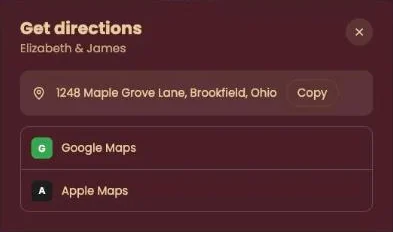
Click Directions at the bottom of the invitation. You’ll see the address, then choose Google Maps or Apple Maps to plan the route from where you are.
How it works
- Click Directions. The address of the venue is at the top of the window.
- Choose Google Maps or Apple Maps. The map opens with the address as your destination.
- Prefer another app, like the satnav in your car? Copy the address with the button next to it and paste it there.
More than one venue?
The button takes you to one address. If there’s a ceremony and then a party somewhere else, read the invitation text carefully: that’s where the host puts the second address.
Look out for parking or entrance details. That kind of practical information is usually in the invitation itself, not in the map app.
Next step: I see "this invitation is not final yet"
Last updated: October 23, 2026