Let the host know if you're coming
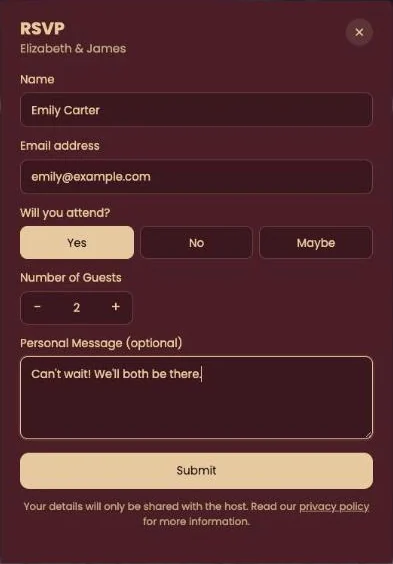
Click RSVP at the bottom of the invitation, fill in the short form and click Submit. Your reply goes straight to the host.
Filling in the form
- Enter your Name and Email address.
- Under Will you attend? choose Yes, No or Maybe.
- Coming, or possibly coming? Use − and + to set the Number of Guests, yourself included.
- Anything to add, such as a dietary need? Write it under Personal Message (optional).
- Click Submit. A confirmation tells you your RSVP has been saved.
Coming as a family or a couple?
Send one reply with the right number of guests rather than a separate one for each person. It keeps the host’s list tidy.
Fill in the form just once. Submitting it again creates a second reply. To change your answer, go through the host: see Changing your reply.
What happens to your details is explained in What happens to my details?.
Next step: Changing your reply
Last updated: October 23, 2026