Leaving a message or photo in the guestbook
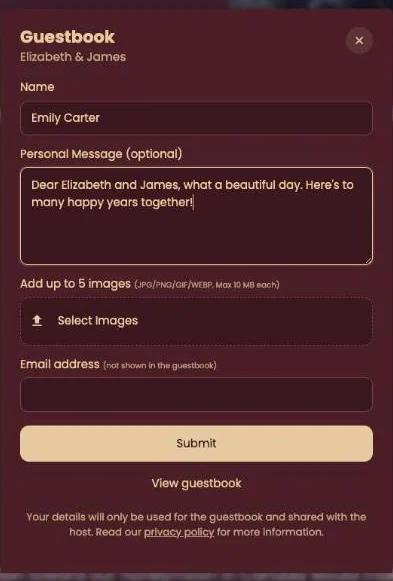
Click Guestbook at the bottom of the invitation, write your message and add photos if you like. For a funeral the button is called Condolence.
Posting a message
- Enter your Name. It appears with your message.
- Write your message. The field says Personal Message (optional), but a message without text isn’t posted.
- Want to share photos? Click Select Images. You can pick up to 5: JPG, PNG, GIF or WEBP, max 10 MB each.
- Enter your Email address. Only the host sees it.
- Click Submit. With photos you’ll see a progress bar; wait until it’s done.
Reading other messages
If the host has made the guestbook public, there’s a link to all messages below the form: View guestbook, or Memorial page for a funeral. No link? Then only the host reads the messages.
A photo missing? Other file types and photos over 10 MB are skipped, while your message is still posted. Choose a smaller JPG or PNG and post a new message.
Next step: Adding the date to your calendar
Last updated: October 23, 2026