Activating your invitation
You activate with the Buy for €19 button, or with Activate if you still have credits. Once paid, your invitation is final and the preview notice disappears for your guests.
Where’s the button?
In three places, and they all do the same thing:
- on the All saved screen, right after saving;
- to the right of your invitation in the Dashboard;
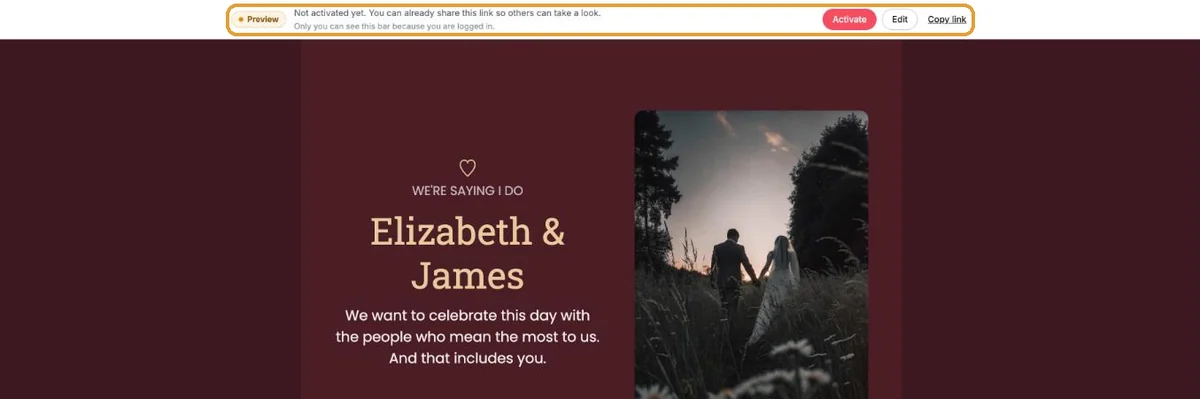
- in the bar at the top of your own invitation (only visible while you’re logged in): Activate takes you to the payment screen.
Paying
- Click Buy for €19.
- You’re taken to Mollie’s secure payment page. Pick a payment method and complete the payment.
- You then return to Eventinfo.pro and see You’re all set! with Payment complete.
Which payment methods you can use is explained in Payment methods.
With a credit
If you’ve bought a bundle, you’ll see Activate instead of the buy button. A message says This will activate your invitation and use 1 credit from your balance. Click Activate once more and you’re done.
What changes?
Above an invitation that isn’t activated, guests saw the label Preview – this invitation is not final yet. That label is now gone. Your own bar shows Activated from now on. The link doesn’t change, so people who already have it don’t need anything new.
Next step: Can I take a look before I pay?
Last updated: October 23, 2026