What do guests see when they RSVP?
A short form in a pop-up window. Your guests don’t need an account, and most are done in half a minute.
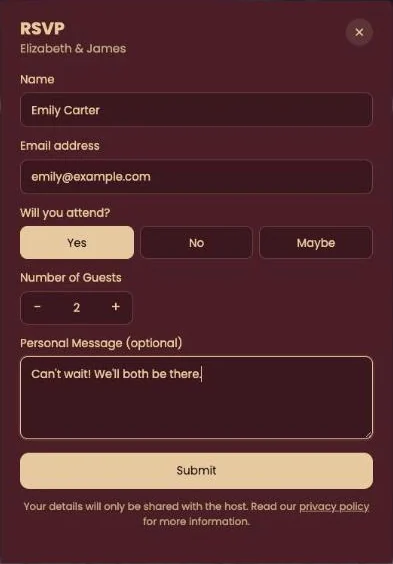
The questions
- Name and Email address. Both required.
- Will you attend? Your guest picks Yes, No or Maybe.
- Number of Guests. Appears after Yes or Maybe. Guests use the minus and plus to choose a number from 1 to 10.
- Personal Message (optional). Room for congratulations or a dietary request.
After clicking Submit, guests see Your RSVP has been saved. Thank you! A line under the form explains that their details are only shared with the host, with a link to the privacy policy.
Change of plans?
Guests can’t edit their own reply. If someone changes their mind, they let you know and you update it in your dashboard (Edit or delete an RSVP). If they simply fill in the form again, you’ll see two lines with that name in your list.
Ask for one reply per household. Mention it in your invitation text, and the number of people in your overview adds up straight away.
Next step: View your RSVP responses
Last updated: October 23, 2026