View your RSVP responses
Every reply is in your dashboard. Click RSVP next to your invitation and you’ll see straight away where things stand.
The counters at the top
At the top you’ll find Yes, No and Maybe, each with the number of replies. For Yes and Maybe, the figure in brackets is the number of people, since one reply can cover a whole family.
Two weeks after Elizabeth and James sent their wedding invitation, it read Yes: 12 (31). Twelve replies, 31 people.
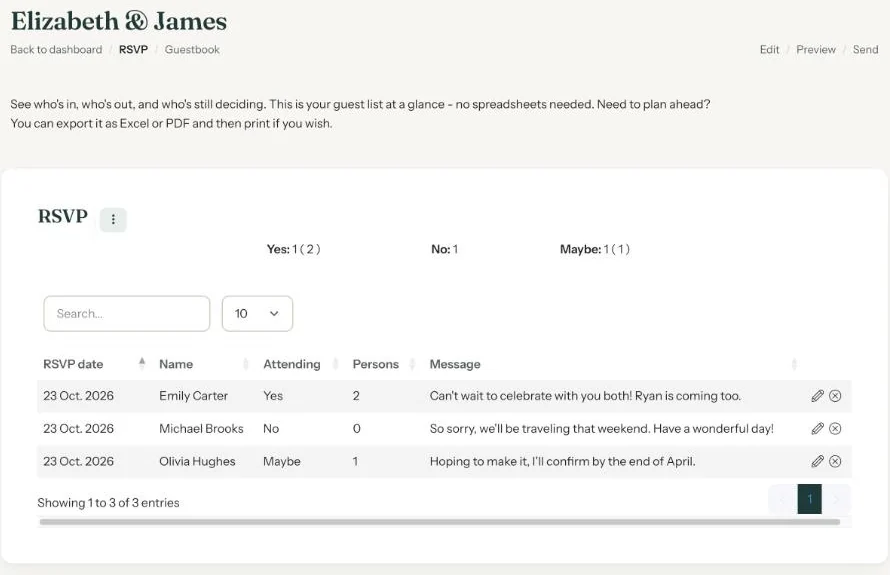
The list
Each reply has its own row, with the columns RSVP date, Name, Attending, Persons and Message.
- Click a column heading to sort, by name or by date for instance.
- Type a name in the search box, or a word from a message such as ‘vegetarian’.
- Ten rows fit on a page. Use the page links at the bottom to see more.
All your invitations in one list
Click RSVP at the top of your dashboard. You’ll see every activated invitation with RSVP, and whether its RSVP is Open or Closed.
Prefer an email when someone replies? On your Account page you can switch notifications for new RSVPs and guestbook entries on or off.
Next step: Download your guest list
Last updated: October 23, 2026