Messages and photos from guests
Guests click Guestbook on your invitation, write a message and add photos if they want. They don’t need an account.
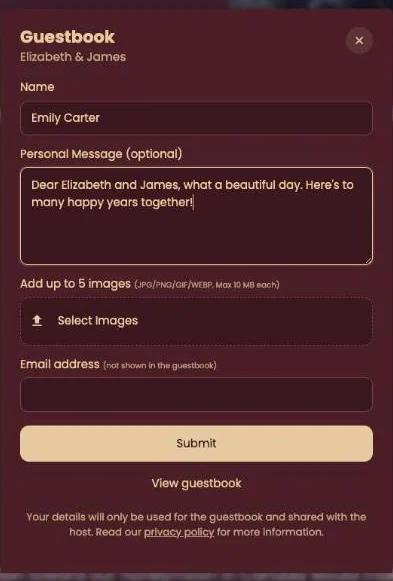
What guests fill in
- Name. It appears above their message.
- A message. The field says (optional), but a message without text won’t send.
- Photos. Up to five via Select Images, as JPG, PNG, GIF or WEBP, at most 10 MB each.
- Email address. Required, but not shown in the guestbook. Only you see it.
After Submit, a progress bar shows the upload. Then Thank you for your message! appears.
What you see
Every message shows up in your dashboard straight away, photos underneath. Very large photos are scaled down to 2000 pixels at most, so the page loads quickly. Want to thank someone personally? Click their name and your email program opens with their address filled in.
Whether other guests can read the message depends on the visibility you choose (Who can see the guestbook?).
Next step: Keep your guestbook
Last updated: October 23, 2026