Turn on the guestbook
The guestbook is already on when you create a new invitation. Guests see a Guestbook button and can write a message there, with photos if they like.
Switch it on or off
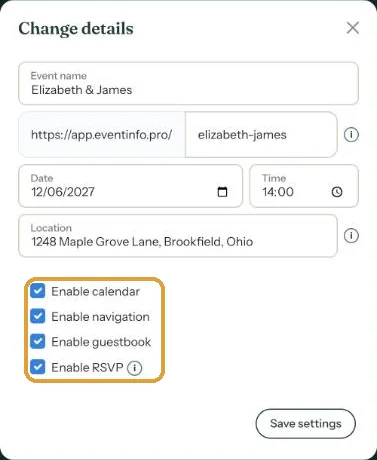
- In your dashboard, click the menu (the three dots) next to your invitation.
- Choose Change details.
- Tick or untick Enable guestbook.
- Click Save settings.
Starting (almost) from scratch? Then you also choose this while creating the invitation, at What do you want to include?
Where to find the messages
With the guestbook on, your invitation gets a Guestbook button in the dashboard. That’s where you read and manage everything guests write (Edit or delete guestbook messages).
A new guestbook is set to Public: anyone with the invitation can read the messages. Rather not? You can change that on the same page (Who can see the guestbook?). For a funeral, the guestbook is called Condolence (An online condolence book with a funeral notice).
Messages come in once your invitation is activated. Before that, guests who try to send one see Not available in preview mode.
Next step: Who can see the guestbook?
Last updated: October 23, 2026