Your dashboard at a glance
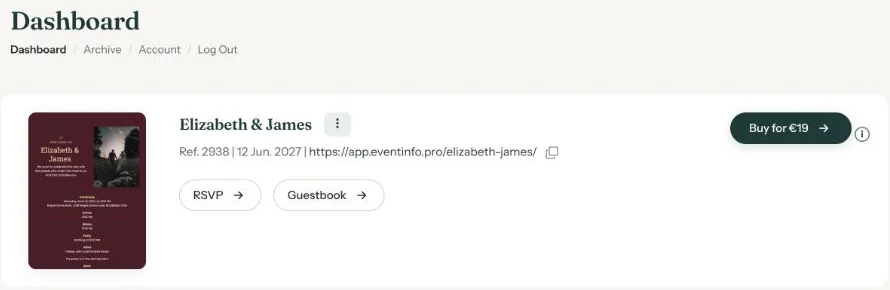
Your dashboard lists all your invitations, newest first. From here you edit them, share them and see the replies.
For each invitation
- The name, with the menu (three dots) next to it.
- Ref. followed by a number. Quote that number if you contact us about this invitation.
- The event date and the link to your invitation, with a small icon to copy it.
- On the right, Buy for €19 (price checked on 22-10-2026), or Activate if you still have credits. Once the invitation is activated, the button disappears.
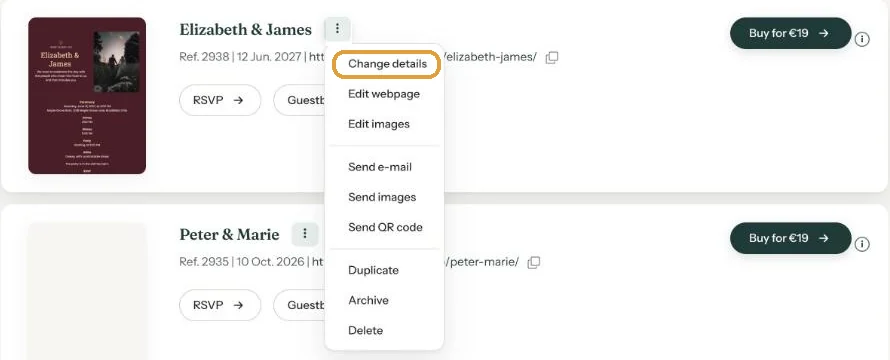
The menu behind the three dots
Change details, Edit webpage and Edit images are for making changes. Send e-mail, Send images and Send QR code help you share. At the bottom are Duplicate, Archive and Delete. The image options only appear once those images have been created.
The other pages
The navigation has Designs, Guestbook, RSVP, Archive and Account. RSVP and Guestbook list your activated invitations; click one to see the replies. Log Out signs you out.
Next step: Updating your event settings
Last updated: October 23, 2026