Updating your event settings
The name, link, date, time, location and buttons of your invitation are together in one window: Change details.
Changing the settings
- In your dashboard, click the menu (three dots) next to your invitation.
- Choose Change details and change what you need.
- Click Save settings. You’ll see Settings saved.
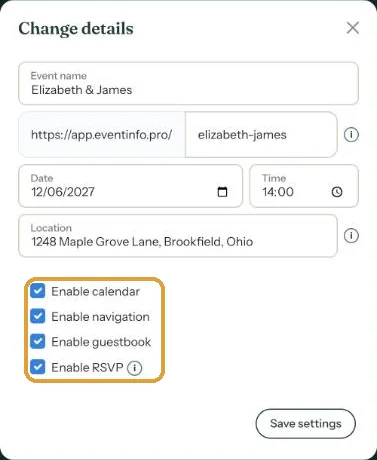
What you can change here
- Event name: shown in your dashboard and used as the title in guests’ calendars.
- Your link: letters, numbers and hyphens. If the link is taken, a number is added. After a change, the old link stops working; see Your invitation's web address.
- Date and Time. A funeral or birth announcement also has a date of passing or a date of birth.
- Location: always pick a suggestion from the list, see Entering the right address.
- The tick boxes for calendar, navigation, guestbook and RSVP: see Which buttons can you turn on?.
The text on your invitation stays as it is. If the date, time or place also appears in the text, change it yourself with Edit webpage.
Next step: Duplicating an invitation
Last updated: October 23, 2026