Forward the invitation yourself
Prefer to send from your own mailbox? Have the designed e-mail sent to you and forward it to your guests.
Sending the e-mail to yourself
You can do this in two places:
- on the All saved screen: click Send me the e-mail (after activation this option is called Send e-mail to yourself and forward to your guests);
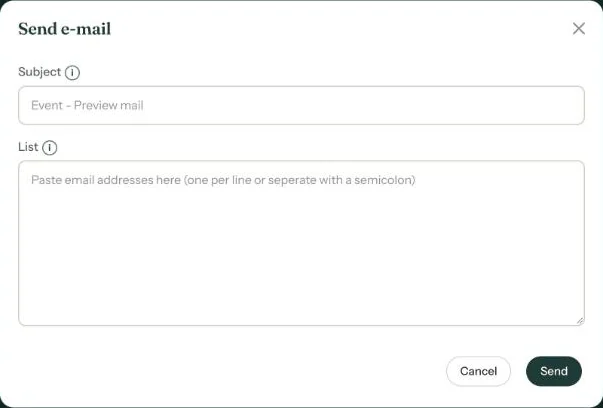
- in the dashboard: choose Send e-mail from the three-dot menu, leave List empty and click Send.
The e-mail arrives at your account’s address. It’s exactly the same e-mail guests get when you send through Eventinfo.pro.
Forwarding
- Open the e-mail in your mail app and choose Forward.
- Put your guests’ addresses in the BCC field, so nobody sees the other addresses.
- Remove “Fwd:” from the subject line and add a personal line at the top if you like.
- Send.
Why do it this way?
The e-mail sits in your sent items, so later you know exactly who received it. Replies simply land in your inbox. And for some guests, a message from an address they know feels more familiar than one from a platform.
Large group? Many mail providers limit the number of recipients per message. Send in a few batches, or use Sending by e-mail through Eventinfo.pro.
Next step: Sending an invitation on WhatsApp
Last updated: October 23, 2026
- All the ways to share your invitation
- Sending by e-mail through Eventinfo.pro
- Forward the invitation yourself
- Sending an invitation on WhatsApp
- A QR code on your card or flyer
- Sending an update after a change
- Your invitation's web address
- Sharing on Instagram
- Sharing on Facebook
- Sharing on LinkedIn
- Sharing on X
- Sharing via Signal, Telegram or text message
- Reminding guests