Sending an invitation on WhatsApp
Copy your invitation’s link and paste it into a WhatsApp message. That’s it. Your guests open the invitation with one tap.
Copying the link
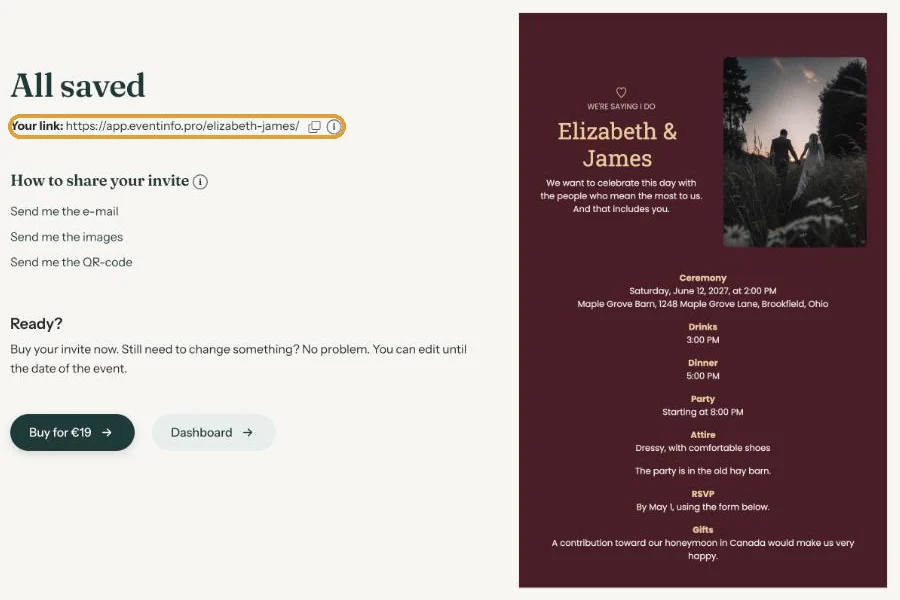
Click the copy icon next to Your link on the All saved screen, or next to the link below your invitation in the dashboard. On your phone you can also do it from the invitation itself: tap Copy link in the bar at the top.
The message
Put the link on the first line. WhatsApp then usually shows a preview of the invitation. A short line underneath is plenty, for example:
https://app.eventinfo.pro/emma-and-james/
We’re getting married! Everything’s on this page. Could you let us know with the RSVP button whether you can come?
With an image
Want the message to stand out more? Click Send me the images. You’ll get an e-mail with a zip file of images of your invitation in several formats. Save one to your phone, attach it in WhatsApp and put the link in the caption. The portrait images also fit your WhatsApp status.
Groups
For a family or friends group, just paste the link in the group. If you’d rather invite people individually, use a broadcast list or forward the message one by one.
Next step: A QR code on your card or flyer
Last updated: October 23, 2026
- All the ways to share your invitation
- Sending by e-mail through Eventinfo.pro
- Forward the invitation yourself
- Sending an invitation on WhatsApp
- A QR code on your card or flyer
- Sending an update after a change
- Your invitation's web address
- Sharing on Instagram
- Sharing on Facebook
- Sharing on LinkedIn
- Sharing on X
- Sharing via Signal, Telegram or text message
- Reminding guests