All the ways to share your invitation
It all comes down to one link. There are five ways to get it to your guests, and you can mix them as you like.
Where are the options?
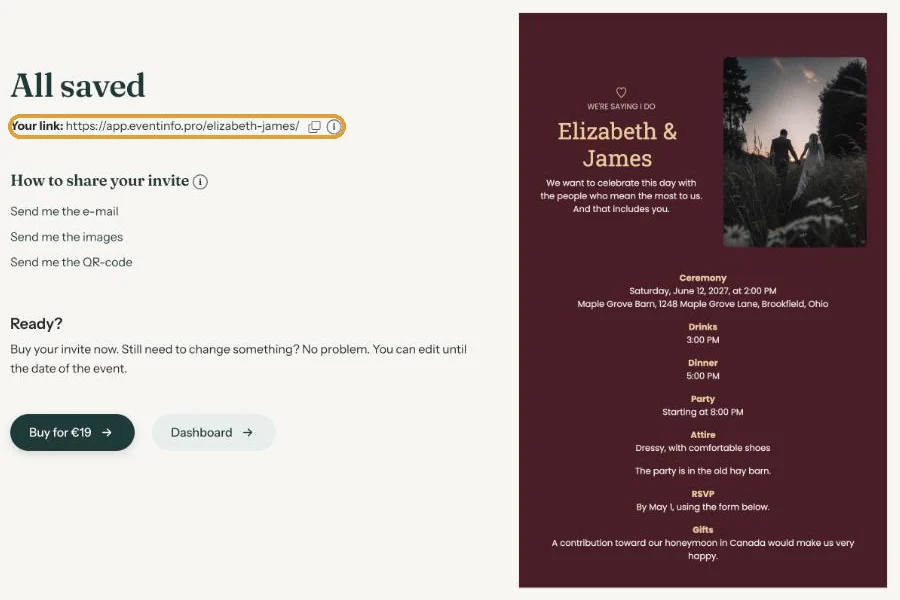
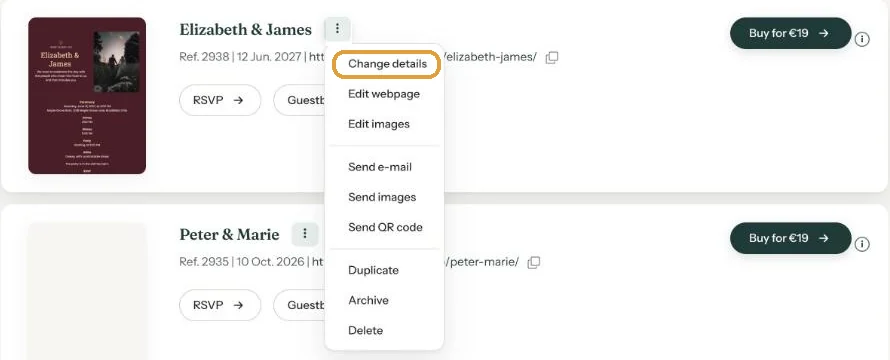
Right after saving, on the All saved screen. Later in the Dashboard, through the three-dot menu next to the name of your invitation.
The five ways
- Copy the link. Click the copy icon next to Your link and paste it anywhere: a group chat, a text message, a newsletter.
- E-mail through Eventinfo.pro. Paste the e-mail addresses into the Send e-mail window and we send a formatted e-mail with your design. See Sending by e-mail through Eventinfo.pro.
- E-mail from your own mailbox. Send me the e-mail sends the same e-mail to you, and you forward it. See Forward the invitation yourself.
- Images. Send me the images gives you a zip file with images in several formats, for WhatsApp, Instagram and other apps. See Sending an invitation on WhatsApp.
- QR code. For a printed card, a flyer or a poster at the entrance. See A QR code on your card or flyer.
Which one suits you?
For a birthday with friends, a message with the link is often enough. For a wedding with older relatives a proper e-mail works better, and perhaps a card with a QR code for grandma. For a funeral notice many people choose e-mail, so the message arrives quietly.
Send everything to yourself first. That way you see exactly what your guests will get before it goes out.
Next step: Sending by e-mail through Eventinfo.pro
Last updated: October 23, 2026
- All the ways to share your invitation
- Sending by e-mail through Eventinfo.pro
- Forward the invitation yourself
- Sending an invitation on WhatsApp
- A QR code on your card or flyer
- Sending an update after a change
- Your invitation's web address
- Sharing on Instagram
- Sharing on Facebook
- Sharing on LinkedIn
- Sharing on X
- Sharing via Signal, Telegram or text message
- Reminding guests