Reminding guests
You can see who has replied in the RSVP overview. Anyone who hasn’t yet gets a short reminder with the same link.
1. Check who has replied
In the dashboard, click RSVP for your invitation. You’ll see the counters Yes, No and Maybe and a list of names.
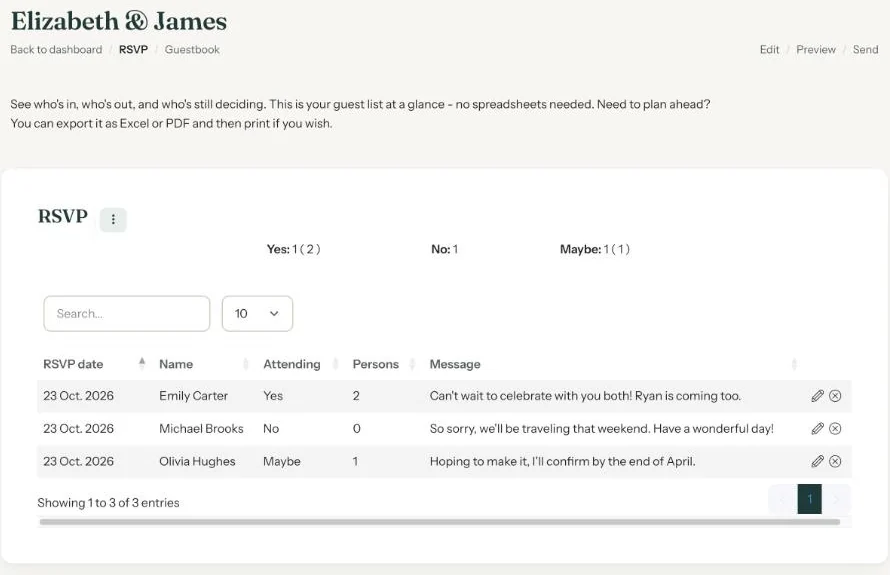
Eventinfo.pro doesn’t know who you invited; e-mail addresses you send to through Eventinfo.pro aren’t stored. So compare the names with your own guest list. Whoever’s left is who you still want to remind.
2. Send a reminder
- By e-mail: choose Send e-mail in the menu, paste only the addresses of people who haven’t replied and set your own Subject, such as “Reminder: can you let us know if you’re coming?”. See Sending by e-mail through Eventinfo.pro.
- On WhatsApp or by text: a personal message with the link. For example: “Hi Mark, we’re finalising the list for 14 June. Could you let us know if you can make it? Just use the RSVP button: https://app.eventinfo.pro/emma-and-james/”
When?
About a week before the reply-by date in your invitation usually works well. For a funeral a reminder is rarely needed; it’s better to leave it.
Give a reply-by date. A clear date in your invitation saves on reminders. There’s no automatic deadline, but you can close the RSVP yourself after that date.
RSVP Last updated: October 23, 2026
- All the ways to share your invitation
- Sending by e-mail through Eventinfo.pro
- Forward the invitation yourself
- Sending an invitation on WhatsApp
- A QR code on your card or flyer
- Sending an update after a change
- Your invitation's web address
- Sharing on Instagram
- Sharing on Facebook
- Sharing on LinkedIn
- Sharing on X
- Sharing via Signal, Telegram or text message
- Reminding guests