Your invitation's web address
Every invitation has its own web address, such as app.eventinfo.pro/emma-and-james/. You choose it when you create the invitation and can still change it later.
When creating it
The address is suggested based on the name you enter. You can change it. Use lower-case letters, numbers and hyphens; spaces and other characters are replaced with a hyphen automatically. If the address is already taken, a number is added, such as -2.
Changing it later
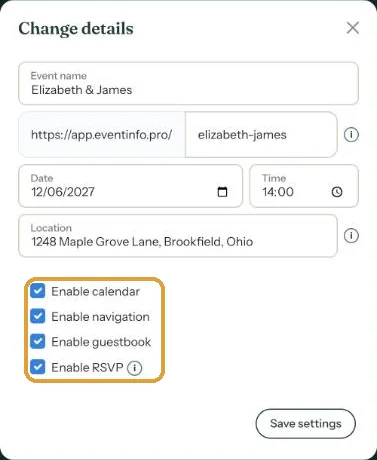
- In the Dashboard, open the three-dot menu next to your invitation and choose Change details.
- Edit the web address in the field after https://app.eventinfo.pro/.
- Click Save settings.
What happens to the old link?
It stops working. Anyone opening the old link no longer reaches your invitation. That applies to everything you’ve already shared:
- e-mails that have already been sent;
- messages on WhatsApp and social media;
- a printed QR code.
So after a change, share the new link again, and get a new QR code with Send QR code if you use one.
Try to get the address right once. A short, recognisable name without a year or date works well, even if the date moves later on.
Next step: Sharing on Instagram
Last updated: October 23, 2026
- All the ways to share your invitation
- Sending by e-mail through Eventinfo.pro
- Forward the invitation yourself
- Sending an invitation on WhatsApp
- A QR code on your card or flyer
- Sending an update after a change
- Your invitation's web address
- Sharing on Instagram
- Sharing on Facebook
- Sharing on LinkedIn
- Sharing on X
- Sharing via Signal, Telegram or text message
- Reminding guests