My invitation still shows example details
With a ready-made design, Eventinfo.pro fills in part of your details for you. The rest of the text still belongs to the sample, and you replace it by hand.
Why this happens
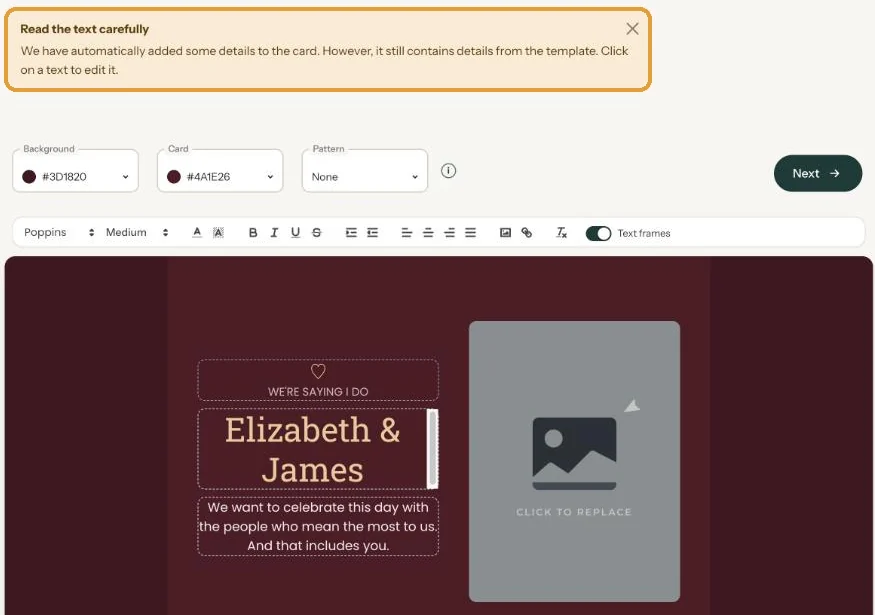
Name, date and time from the Details screen usually appear on the card by themselves. Other text, like an address, a programme or a reply-by date, is sample text from the design. That’s why the builder shows a yellow notice:
- Read the text carefully: some details were added, the rest still comes from the design.
- Check the text: this design still contains example details: the name, date or location you entered isn’t in the text yet. The notice lists what you entered so you can copy it in.
How to fix it
- Open the invitation with Edit webpage in your dashboard menu.
- Read the card from top to bottom and click any text that isn’t right to change it.
- Pay extra attention to addresses, times in a programme, a reply-by date and names.
- Click Next to save.
Guests already have the link? No problem. They see the corrected version as soon as they open the link again; there’s no need to resend it.
More about sample text in Replacing the example text with your own details.
Last updated: October 23, 2026
- My guests didn't receive the email
- WhatsApp or Facebook shows an old image
- My photo won't upload
- My invitation still shows example details
- Payment failed or invitation not activated
- My invitation looks different on mobile
- Checking your invitation the way guests see it
- The Add to calendar or Directions button doesn't work