My guests didn't receive the email
Most of the time the email is in the spam or promotions folder, or there’s a mistake in the address list. Go through the causes below, from most to least likely.
1. It’s in spam or another tab
The invitation arrives with your name as the sender, sent via Eventinfo.pro. Some email programs put a message like that in Spam, Junk or (in Gmail) the Promotions tab. Ask your guests to look there and mark the message as “not spam”.
2. There’s a mistake in the list
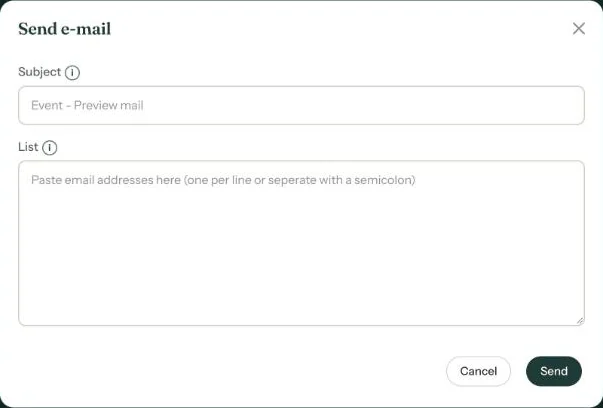
Open Send e-mail and check how you pasted the addresses. Put one per line, or separate them with a semicolon. A comma as separator or a typo in an address won’t work. You can send to up to 1,000 addresses at a time.
3. You only sent a test
If the List field was empty, the email went only to you, as a test. Paste the addresses and send again.
4. The address doesn’t exist (anymore)
Eventinfo.pro doesn’t store the addresses and doesn’t check whether an email arrived or was opened. So Message sent! means sent, not necessarily received. Ask the guest for another address.
More about sending and sharing in Sending and sharing.
Last updated: October 23, 2026
- My guests didn't receive the email
- WhatsApp or Facebook shows an old image
- My photo won't upload
- My invitation still shows example details
- Payment failed or invitation not activated
- My invitation looks different on mobile
- Checking your invitation the way guests see it
- The Add to calendar or Directions button doesn't work