Using keyboard shortcuts
The usual shortcuts for formatting and undo work in the builder’s text fields. On Windows you use Ctrl, on a Mac Cmd.
In a text field
- Ctrl+B (Mac: Cmd+B): bold
- Ctrl+I (Mac: Cmd+I): italic
- Ctrl+U (Mac: Cmd+U): underline
- Ctrl+Z (Mac: Cmd+Z): undo the last change
- Ctrl+Shift+Z (Mac: Cmd+Shift+Z): redo; on Windows, Ctrl+Y works too
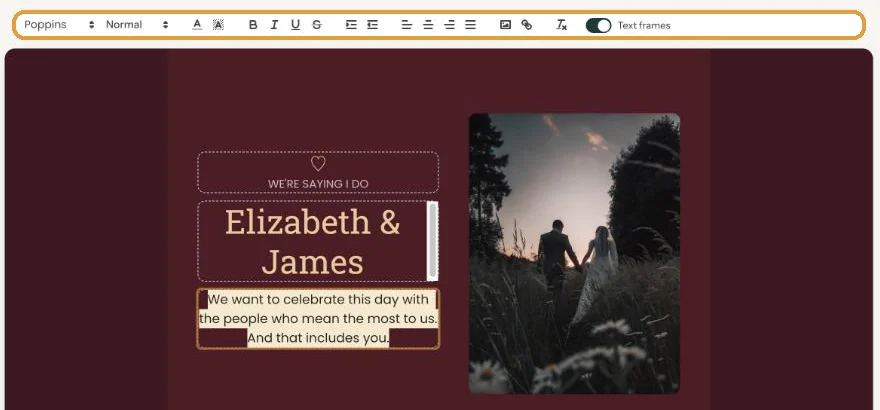
Select the text you want to format first. If you press the shortcut with nothing selected, the formatting applies to whatever you type next. Press it again to turn it off.
Undo works per text field, so only in the field where your cursor is. More in Undoing changes.
Cut, copy and paste work as usual. If you paste text from another program, check the formatting: the font and size can come along with it. Select the text and use clear formatting if it doesn’t fit.
Outside the text
- Esc closes an open colour bar or drop-down menu.
- Enter in the colour code box applies that colour.
Strikethrough, alignment, indenting and colours are done with the buttons in the text bar.
Text done? Put your own photo on the card: Images.
Last updated: October 23, 2026
- Designing your invitation: the basics
- Choosing a layout
- Choosing the background and card colour
- Using the colour picker and pipette
- Editing and formatting text
- Replacing the example text with your own details
- A new look in seconds with Redesign
- Undoing changes
- Moving and aligning text
- Showing or hiding text frames
- Adding a pattern
- Adding a link to your text
- Adding a schedule for the day
- Customising a ready-made design
- Using keyboard shortcuts