Showing or hiding text frames
The dotted lines around the texts on your card are text frames. They show where each text field sits. Your guests don’t see them, and they’re not in the social media images either.
Where’s the switch?
On the right of the text bar you’ll find Text frames. Hover over it and you’ll see Only visible while editing.
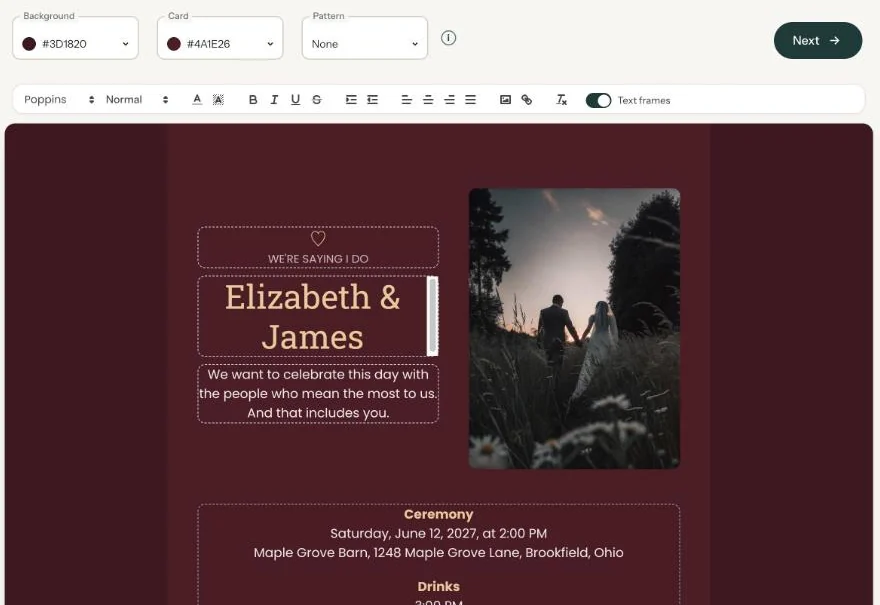
- On: every text field has a dotted outline. The field you’re working in gets a slightly darker edge.
- Off: you see the card without lines, the way it will look.
When to switch them off
While you’re typing, leaving them on is easiest. You can tell which field you’re clicking into, even if it’s empty. Switch them off when you want to judge the overall look, for example after choosing colours.
Each time you open the builder, the text frames are switched on again.
Finding an empty field. Deleted all the text from a field? With text frames on you can still see where it was, so you can click back into it later.
To see the invitation with your guests’ buttons, open the link after Preview on at the top of the page.
Next step: Adding a pattern
Last updated: October 23, 2026
- Designing your invitation: the basics
- Choosing a layout
- Choosing the background and card colour
- Using the colour picker and pipette
- Editing and formatting text
- Replacing the example text with your own details
- A new look in seconds with Redesign
- Undoing changes
- Moving and aligning text
- Showing or hiding text frames
- Adding a pattern
- Adding a link to your text
- Adding a schedule for the day
- Customising a ready-made design
- Using keyboard shortcuts