Downloading your images or sending them to yourself
You download your chosen images on the All saved screen, one by one or all in a zip. Prefer email? Then use Send me the images.
Downloading on the All saved screen
After choosing, you land on All saved. Under Send me the images you see small previews of your images.
- Click a preview (the circle with the arrow) to download that one image.
- Click Download as zip for all chosen images in one file.
- Click the link with the number of chosen images to go back and make a different choice.
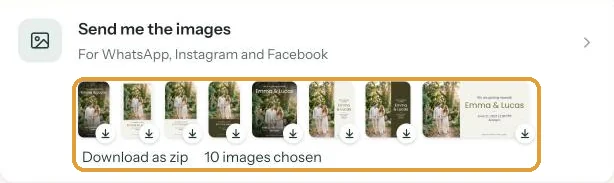
In the zip, each file has a number and the format in its name, such as 01-story-foto.jpg and 05-feed-foto.jpg. That way you can see straight away which one is for a story and which one for a post.
By email
On the All saved screen, or in your dashboard in the menu (three dots), click Send me the images. You receive an email with your chosen images as a zip. Handy if you want them on your phone.
Then share
Save the image on your phone and post it in your story or post, together with the link to your invitation. How that works per app is explained in Sharing on Instagram and Sending an invitation on WhatsApp.
Next step: Keeping text readable on your photo
Last updated: November 24, 2026
- Add or replace a photo
- Which photo works best?
- The images for social media
- Choosing and adjusting your social media images
- Downloading your images or sending them to yourself
- Keeping text readable on your photo
- Rounded corners and shadow
- An illustration instead of a photo
- Can I use a background image?